Lesson
UC10153 -- Working with collections -- Week 1
Draft, 08 August 2016
This page should be in a useful state, but still needs work before it's finished.
Introduction
What this unit is about?
- This unit is about the diversity of cultural heritage collections and the techniques we use to describe, manage, use, and explore them.
- The focus is on the intellectual, rather than physical, control. So not how we store things, but how we develop systems and standards to describe them.
- We’ll also be exploring the role of descriptive systems in supporting the discovery and use of collections. What can we do with them, particularly in the digital realm?
What’s expected of you?
- To benefit from this unit you need to participate, either on-campus, or online (or both).
- There won’t be any lectures. Instead, I’ll work with you each week to complete a set of activities.
- You can either attend the weekly on-campus workshops or undertake the activities in your own time with online support.
- A small number of readings or videos will be assigned each week to provide important background information. You’re expected to read or watch these before undertaking the activities.
- As part of your assessment, you’ll be expected to write and share a short reflection on each week’s activities. See Assessment 1 on the Moodle site for more information.
What’s expected of me?
- I’ll provide details of any relevant readings for the coming week by Monday of that week.
- I’ll document the activities and make them available online in time for the on-campus workshop (Tuesday, 1.30-4.30pm).
- I’ll be available to assist online students via Google Hangout on Wednesday from 8.00-10.00pm. I’ll post the link on Slack and Moodle in advance.
- I’ll be available on-campus on Tuesday and Wednesday mornings (see Moodle for details).
- I’ll monitor Slack and Moodle for any additional questions or problems you might have.
Assessment
Full details of the three assessment items for this unit are on Moodle. In summary:
- Participation and reflection (20%): You’ll post weekly reflections on class activities to the Moodle forum by the end of each week.
- Collection proposal (30%): You’ll develop a proposal to a real (or fictional) cultural heritage organisation arguing for the development of a new collection.
- Collection development (50%): You’ll create an online collection with a minimum of 20 items in Omeka.
Using Slack for communication and questions
Anyone who’s used Moodle knows that it can be difficult to have conversations or keep up to date with the latest information. To overcome some of these difficulties and provide an easy-to-use communication channel, we’ll be making use of Slack – a popular messaging platform for teams.
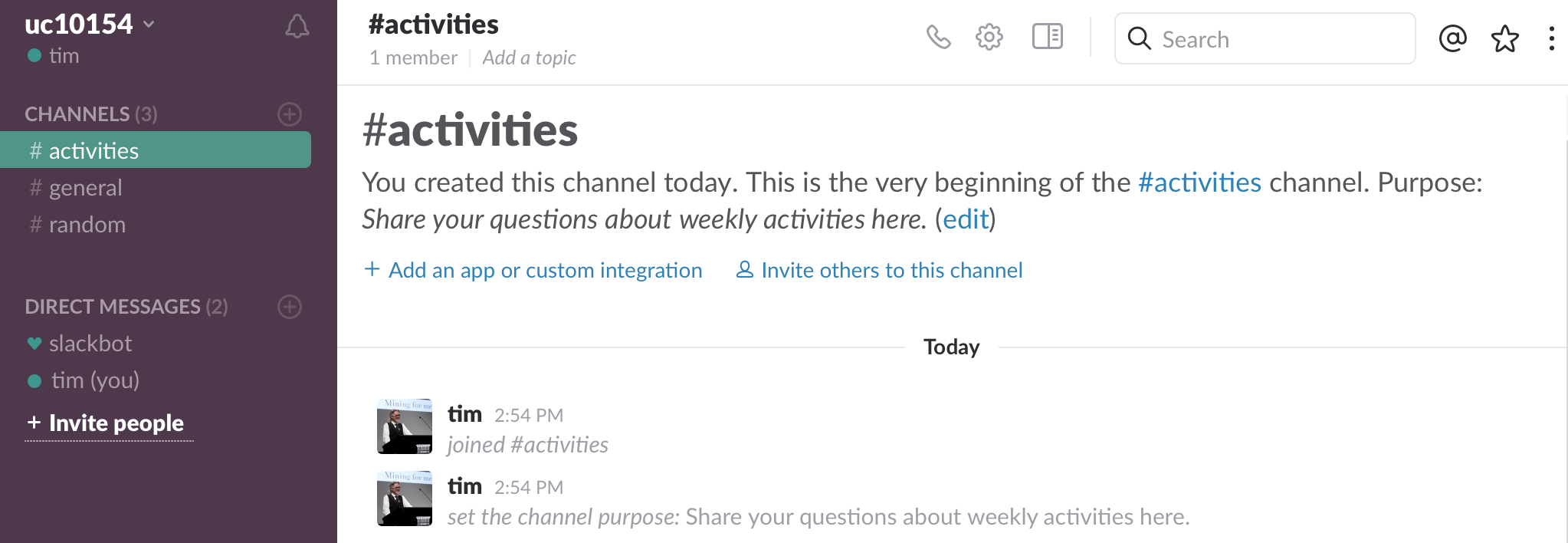
Slack is widely used in workplaces so, unlike Moodle, it’s a tool you might make use of in your future careers. It’s also more fun than Moodle.
To sign up, just go to:
https://uc10153.slack.com/signup
and use your canberra.edu.au email address to register. The process is painless – just follow the instructions and you’ll be set up in minutes. Once you have your account you might want to download and install one of the Slack apps, so you can have easy access on all of your devices.
For more information see Slack’s Getting Started guide.
Annotate this!
Another handy tool you can make use of throughout the unit is Hypothes.is. Hypothes.is makes it easy to add notes and comments to any web page. Including this one – I’ve embedded Hypothes.is in this site.
Try selecting some text on this page – you should see an option to highlight or annotate. That’s Hypothes.is at work. To actually add an annotation you’ll need to set up a free account with Hypothes.is. There’s some more details on this page.
Why might this be useful? You can use it to add your own private notes to activities – to remind you of things to follow up, or important things to remember. If you come across something that I haven’t explained very well, you could add an annotation with a clarification or question. You can use Hypothes.is to make these pages better!
Try Hypothes.is and think about other uses within the cultural heritage sector. For example, here’s a recent blog post that talks about using it with historical sources.
Collectors and collections
Introducing Trove
Let’s start our exploration of collections by getting to know Trove.
Why? Trove is a collection of collections – it brings together the holdings of hundreds of organisations, from local historical societies to national institutions. It’s a useful place to get an overview of Australia’s cultural heritage collections. But don’t be fooled into thinking that Trove includes everything! (We’ll be following this up in coming weeks.)
Let’s try a simple search:
- Go to trove.nla.gov.au
- Look around the page. What sorts of things are in Trove? How many resources are currently included? [Hover for answer]
- Type ‘butter pat’ (without the quotes) in the search box and click ‘Search’.
- Find the ‘Pictures, photos, objects’ results box and click on it to focus on results from the Trove pictures zone. (There’s more about Trove’s zones here.)
- Let’s refine our results using facets. Under ‘Refine your results’ on the left hand side, click ‘Object’. What happens?
- Look through your results for a wooden butter pat. How many can you find? Where do they come from?
- Click on the title of an object to view more details. Now click on the thumbnail or the ‘view at…’ link – Trove will send you to the website of the organisation that holds the object.
As you can see, using Trove you explore collections all around Australia. For more search hints see the Trove help documentation.
And now a challenge. What is the story behind this photo? [Hover for hint]

Stumped? [Another hint]
Are we all curators now?
Trove brings together cultural heritage collections, but it does more. It’s a place where individuals can create and contribute their own collections. For example, anyone can add their photos to Trove, simply by sharing them with the Australia in Pictures group on Flickr.
Do you share photos, links, or posts online? Do you create your own collections using tools such as Pinterest or Tumblr? The development of social media and a range of digital collecting tools has made it easier for us to find, organise and share things that are of interest to us.
Along the way, however, the word ‘curator’ has taken a bit of a battering. Read this short article – ‘All curators now’ and watch this video:
Is there a difference between the sort of collecting that an individual undertakes and what happens in a museum or archive? What is that difference?
This is a question we’ll return to several times throughout this unit. We’ll examine questions like authority and control – who chooses what is kept and why? We’ll also look at how collection items can be embedded within systems that document their context and relationships. What gives an object its meaning, significance, and authenticity?
Using Trove, people can assemble their own collections, reflecting their interests, and serving the needs of their own communities. Let’s look at some examples:
- Go to Trove and click on ‘tags’ near the top of the page. Here you’ll find a list of the most popular tags added by users to items in Trove.
- Look for ‘LRRSA’. What do you think it means? [Hover for answer]
- A group of enthusiasts have agreed to use a particular tag – something like a controlled vocabulary – to bring together resources that are of interest to them.
Lists are another way that Trove users can create their own collections. They’re simply groups of resources on a particular topic. Here’s a short video describing how to use them:
Note that lists work a bit differently with digitised newspaper articles.
Making your own Trove collection
Following the instructions in the video and the information in the Trove Help Centre, try creating your own list.
Before you start adding items you’ll need to set up your own Trove account:
- Click on the ‘Sign up’ button, and follow the instructions. You’ll receive an email to verify your registration.
- Once your account is verified, you might need to click on the ‘Login’ button and enter your details.
You’re welcome to create a list on any topic that interests you. If inspiration fails, how about following up on our search example and documenting the amazing history of butter in Australia?
Here are the requirements for your list:
- Use Australian content only (try using the ‘Australian only’ checkbox to limit your results)
- Add at least 10 items.
- Include at least 2 photos, 2 objects, and 2 newspaper articles.
- Use items with thumbnail images if possible.
Once you’ve done, go to your list (you can always find your own lists by looking under your User Profile). Click on the ‘List options’ link on the top right of your list and see if you can work out how to select a representative image for your list.
Once you’re done, share a link to your list on Slack.
From collection to exhibition

Trove lists are handy, but they don’t look very pretty. That’s why I built a way of taking the content of a list (or a series of lists) and turning them into a simple online exhibition.
Here’s an exhibition about The Chinese in NSW that pulls together content from 10 different lists. Each list provides a different exhibition theme or topic.
It’s easy to turn your list into an exhibition, just follow these instructions. Have a go and share the results on Slack.
Not only is this a nicer way of presenting the contents of your lists, it’s an example of what becomes possible once we share collection data online. We can not only search it, we can build new things with it. We’ll be exploring more examples of this throughout the unit.